
System Design Interview Fundamentals: Everything You Need to Know

Hello there, future system architects! Are you passionate about building scalable, efficient, and robust systems but find the whole system design process a bit daunting? Well, you're not alone! System design is an essential skill for any software engineer, and today, we're delving deep into creating a master system design template. Intrigued? Let's dive right in.
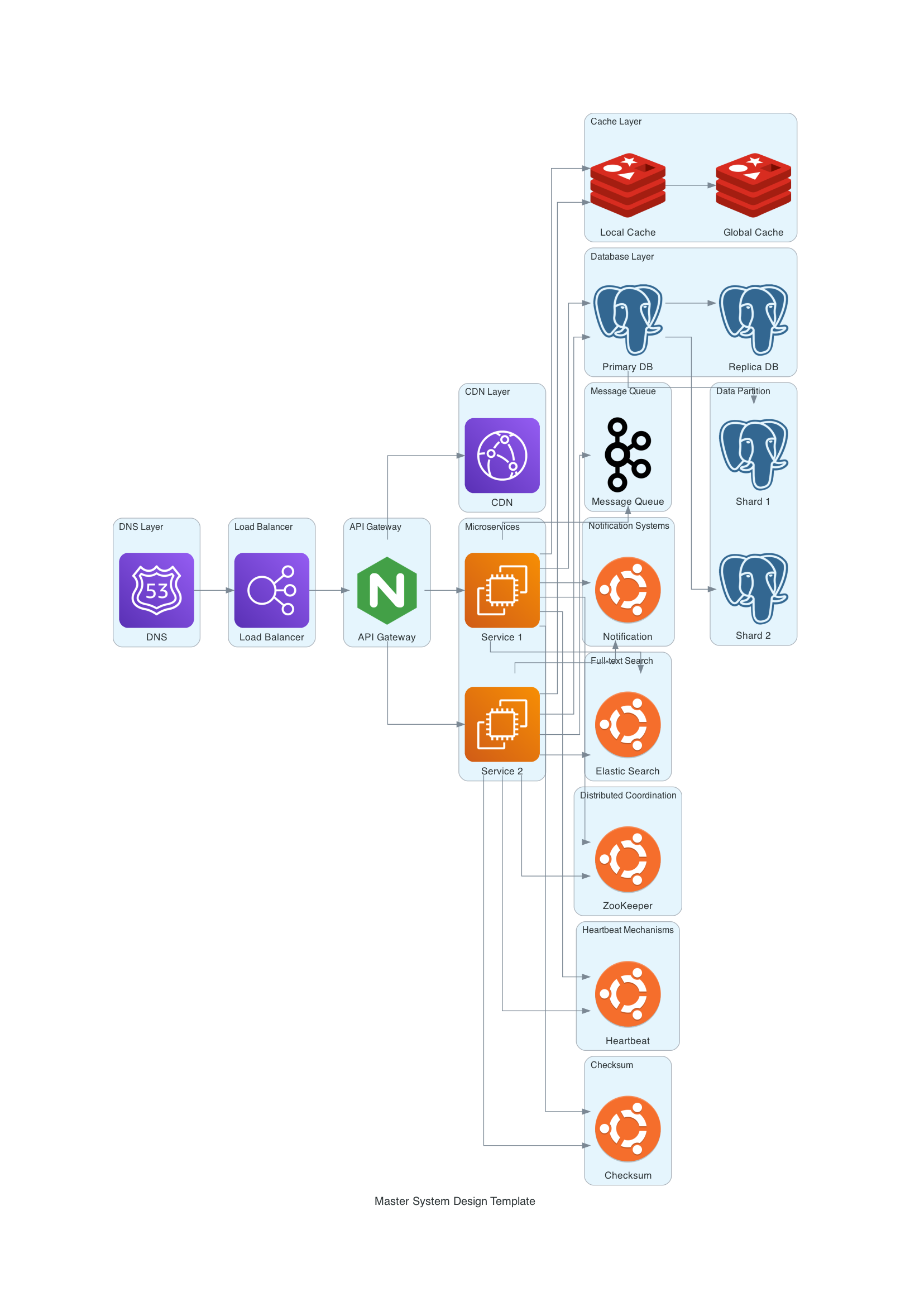
Table of Contents
DNS Layer: The Starting Point
CDN Layer: Speeding Things Up
Load Balancer: Distributing the Load
API Gateway: The Middleman
Cache Layer: Speed is Key
Database Layer: The Data Warehouse
Message Queue: The Communication Backbone
Microservices: The Modular Approach
Notification Systems: Keeping Users in the Loop
Full-text Search: Finding a Needle in a Haystack
Distributed Coordination: Keeping It All Together
Heartbeat Mechanisms: The Health Checker
Checksum: Ensuring Data Integrity
Wrapping Up
DNS Layer: The Starting Point
Let's kick things off with the DNS Layer. Think of it as your system's reception desk, translating user-friendly domain names into IP addresses. We used AWS Route53 in our template for this purpose, setting the stage for user requests to navigate through the system.
When a user inputs a domain name into their web browser, the DNS begins the process of finding the associated IP address and directing the request to the appropriate server. This process starts with the user's computer sending a query to a recursive resolver. The recursive resolver then searches a series of DNS servers, starting with the root server, followed by the Top-Level Domain (TLD) server, and finally the authoritative name server. Once the IP address is located, the recursive resolver returns it to the user's computer, allowing their browser to establish a connection with the target server and access the desired content.
CDN Layer: Speeding Things Up
Next, we have the CDN (Content Delivery Network) Layer. We used AWS CloudFront, which stores and distributes digital assets like images, videos, and scripts based on user geography. The closer the server, the faster the content delivery!
A Content Delivery Network, commonly known as CDN, is an intricate network of distributed servers. Its primary role is to store and distribute digital assets like images, videos, and scripts to users based on their geographical proximity to the nearest server in the CDN network, often called an edge server.
How Does a CDN Work?
User Request Handling: When a user initiates a request for content, the CDN routes the request to the closest edge server.
Content Caching: If the edge server has the content in its cache, it delivers it straight to the user, thereby reducing latency and improving user experience.
Fetching from Origin: If the content isn't cached, the CDN fetches it from the origin server and caches it for subsequent requests.
Cache Updates: The CDN regularly syncs with the origin server to keep its cache current.
Load Balancer: Distributing the Load
The Load Balancer is your system's traffic cop, channeling incoming network traffic across multiple servers. In our template, we used AWS ELB (Elastic Load Balancer) to manage this distribution, ensuring optimal resource utilization and reduced latency.
As I continue to explore the topic of scaling applications, I cannot overlook the importance of a load balancer. A load balancer is a networking device or software that ensures optimal resource utilization, reduced latency, and maintained high availability by distributing incoming network traffic across multiple servers. This is particularly useful in situations where there is a sudden surge in traffic or uneven distribution of requests among servers.
To determine the distribution of incoming traffic, load balancers employ various algorithms. Some common algorithms include Round Robin, Least Connections, and IP Hash. Round Robin distributes requests sequentially and evenly across all available servers in a cyclical manner. Least Connections assigns requests to the server with the fewest active connections, giving priority to less-busy servers. IP Hash hashes the client's IP address to determine which server the request should be directed to. This method ensures that a specific client's requests are consistently routed to the same server, helping maintain session persistence.
Overall, a load balancer is an essential tool for efficiently managing server workloads and scaling applications.
API Gateway: The Middleman
The API Gateway is the gatekeeper of your system. It routes incoming API requests to the appropriate backend service or microservice. In our template, we used Nginx for this crucial task, adding another layer of efficiency and security.
As an intermediary between external clients and internal microservices or API-based backend services, the API Gateway serves a critical role in modern architectures, particularly in microservices-based systems. Its primary functions include request routing, authentication and authorization, rate limiting and throttling, caching, and request and response transformation.
Request routing is one of the most important functions of an API Gateway. It directs incoming API requests from clients to the appropriate backend service or microservice, based on predefined rules and configurations. This ensures that requests are handled efficiently and that clients receive the appropriate responses.
Authentication and authorization are also crucial functions of an API Gateway. It manages user authentication and authorization, ensuring that only authorized clients can access the services. It verifies API keys, tokens, or other credentials before routing requests to the backend services.
To safeguard backend services from excessive load or abuse, the API Gateway enforces rate limits or throttles requests from clients according to predefined policies. This helps ensure that the backend services remain available and responsive to all clients.
Caching is another important function of an API Gateway. It minimizes latency and backend load by caching frequently-used responses and serving them directly to clients without the need to query the backend services. This helps improve performance and reduce the load on backend services.
Finally, the API Gateway can modify requests and responses, such as converting data formats, adding or removing headers, or altering query parameters, to ensure compatibility between clients and services. This helps ensure that clients can interact with the backend services in a way that is consistent with their needs and preferences.
Overall, the API Gateway is a critical component in modern architectures, particularly in microservices-based systems. It streamlines the communication process and offers a single entry point for clients to access various services.
Cache Layer: Speed is Key
Caching can dramatically speed up data retrieval. Our template includes both local and global caching using Redis. Local caching occurs at the client, DNS, CDN, and other local points, while global caching can take place in API gateways, servers, and databases.
Caching is the high-velocity layer sandwiched between your application and its data sources, like databases or remote services. When data is requested, the cache is the first place checked.
Local Caching: Occurs on the client, DNS, CDN, and other local points.
Global Caching: Can occur in API gateways, servers, databases, and more.
Database Layer: The Data Warehouse
The database is the heart of any system. Our master template uses PostgreSQL for both the primary and replica databases. To improve performance further, we employ data partitioning techniques like sharding.
Data partitioning involves dividing database tables for better performance. Two primary methods are employed:
Horizontal Partitioning (Sharding): Divides table rows and stores them on separate servers.
Vertical Partitioning: Splits columns into distinct tables for faster query processing.
Database replication aims to improve data availability by maintaining multiple copies of a database across several servers. Benefits include:
Improved Query Performance: Reduced load on the primary database.
High Availability: Continuous data access even if the primary database fails.
Enhanced Data Security: Multiple copies safeguard against data loss.
Message Queue: The Communication Backbone
A message queue is essential for asynchronous communication between different system components. Apache Kafka serves as our message queue in the template, facilitating decoupling and independent functionality.
Distributed messaging systems like Apache Kafka and RabbitMQ offer a robust method for message exchanges between disparate applications, services, or components, facilitating decoupling and independent functionality.
Microservices: The Modular Approach
Microservices offer a modular approach to system design. They are small, independently deployable units focusing on single responsibilities. In our template, we used AWS EC2 instances to represent these units.
Microservices are small, independently deployable units of an application. They focus on single responsibilities and communicate via well-defined APIs. Benefits include:
Single Responsibility: Easier to understand and manage.
Independence: Can be developed, deployed, and scaled individually.
Fault Tolerance: Less risk of system-wide failure.
Notification Systems: Keeping Users in the Loop
Notification systems are the mouthpiece of your application. They send out alerts, emails, or texts to keep users informed. In our design, we used an Ubuntu server to handle this task.
Full-text Search: Finding a Needle in a Haystack
For efficiently locating relevant content, nothing beats a full-text search. Our master template employs an Ubuntu server representing Elastic Search for this function.
Distributed Coordination: Keeping It All Together
In a distributed system, coordination is crucial. Our template uses an Ubuntu server representing Apache ZooKeeper for regulating and synchronizing activities.
Heartbeat Mechanisms: The Health Checker
To monitor server health, our template employs a heartbeat mechanism, represented by an Ubuntu server. It ensures that all systems are 'alive' and functioning as expected.
In a distributed environment, heartbeating helps monitor the health of servers, allowing for corrective actions in case of failures.
Checksum: Ensuring Data Integrity
Last but not least, the checksum ensures that data remains uncorrupted during transfer between system components. Again, an Ubuntu server in our template takes care of this.
Checksums, calculated using cryptographic hash functions, ensure that data remains uncorrupted during transfer between system components.
In conclusion, understanding these key aspects of modern system architecture is integral to developing and maintaining robust, scalable, and efficient systems. Armed with this knowledge, you're well-prepared to navigate the complexities of today's digital world.
Why System Design Interviews are Crucial
Hey there! So, you've been grinding through coding problems, mastering algorithms, and are all set for your technical interviews, right? But wait, what about the system design interview? If you're scratching your head, wondering what that's all about, you're in the right place. We're diving deep into the fundamentals of system design interviews, a key component that can make or break your next job application. Intrigued? Let's get started.
The Anatomy of a System Design Interview
What is a System Design Interview?
Let's cut through the jargon, shall we? A system design interview is a discussion, where you and your interviewer dissect complex engineering problems. Think of it as a sandbox where your problem-solving skills are put to the test.
Types of Questions
System design questions usually come in two flavors:
High-Level Design: You'll tackle problems related to system architecture and APIs.
Low-Level Design: Here, you dig deeper into databases, caching, and other back-end processes.
Does that sound overwhelming? Don't worry; we'll guide you through it.
Preparation Strategy: The What and How
Understand the Basics
The first step in conquering any challenge is understanding its basics. For system design interviews, you need to grasp concepts like load balancing, databases, and caching.
Study Past Questions
What's the best way to anticipate the questions you'll face? Study past ones! Platforms like LeetCode and HackerRank can be your best friends here.
Follow Industry Leaders
Keep an eye on blogs, podcasts, and talks by industry leaders. It's like having a mentor guide you through the labyrinth of system design.
Common Mistakes to Avoid
Ever heard the phrase, "To err is human?" Well, some errors can cost you a job offer. Let's look at some common pitfalls:
Overcomplicating Solutions: Simple is often better.
Ignoring Scalability: Always consider how your design will scale.
Neglecting Non-Functional Requirements: Don't forget about security, compliance, and data integrity.
Top Tools for System Design
Here are some tools that could be your knight in shining armor:
Diagram Software: Tools like Lucidchart can help visualize your thoughts.
Coding IDEs: Use IDEs that support multiple languages.
Cloud Services: Familiarize yourself with AWS, Google Cloud, or Azure.
Case Study: Designing a Rate Limiter
Rate limiting is essential for controlling the number of requests a system can handle. Let's see how to design a robust rate limiter:
Identify Requirements: What should the rate limiter accomplish?
Choose Algorithms: Token Bucket or Leaky Bucket?
Implementation: Dive into the code.
Pro Tips for Success
Be Verbose: Explain your thought process clearly.
Ask Questions: Clarify any ambiguities.
Practice: The more you practice, the better you get.
The Interview Day
So, the D-day is here. What should you expect?
Technical Screening: Expect some basic questions to test your skills.
Behavioral Questions: These gauge your soft skills and cultural fit.
System Design Round: This is the main event.
Post-Interview Reflection
Once the adrenaline rush subsides, take a moment to reflect. What went well? What could have been better? Use this as a learning opportunity for future interviews.
FAQs
What are some good resources for preparing for system design interviews?
Websites like LeetCode, HackerRank, and various blogs by industry experts are excellent resources.
How long should I prepare for a system design interview?
A preparation period of 1-2 months is generally sufficient for most candidates.
Do I need to know multiple programming languages?
While not a strict requirement, knowing multiple languages can give you an edge.
How do I practice for a system design interview?
Work on real-world projects, participate in online challenges, and follow industry leaders.
Is it possible to succeed in a system design interview without prior experience?
While challenging, it's not impossible. A strong grasp of the fundamentals and thorough preparation can make up for a lack of experience.
Wrapping Up
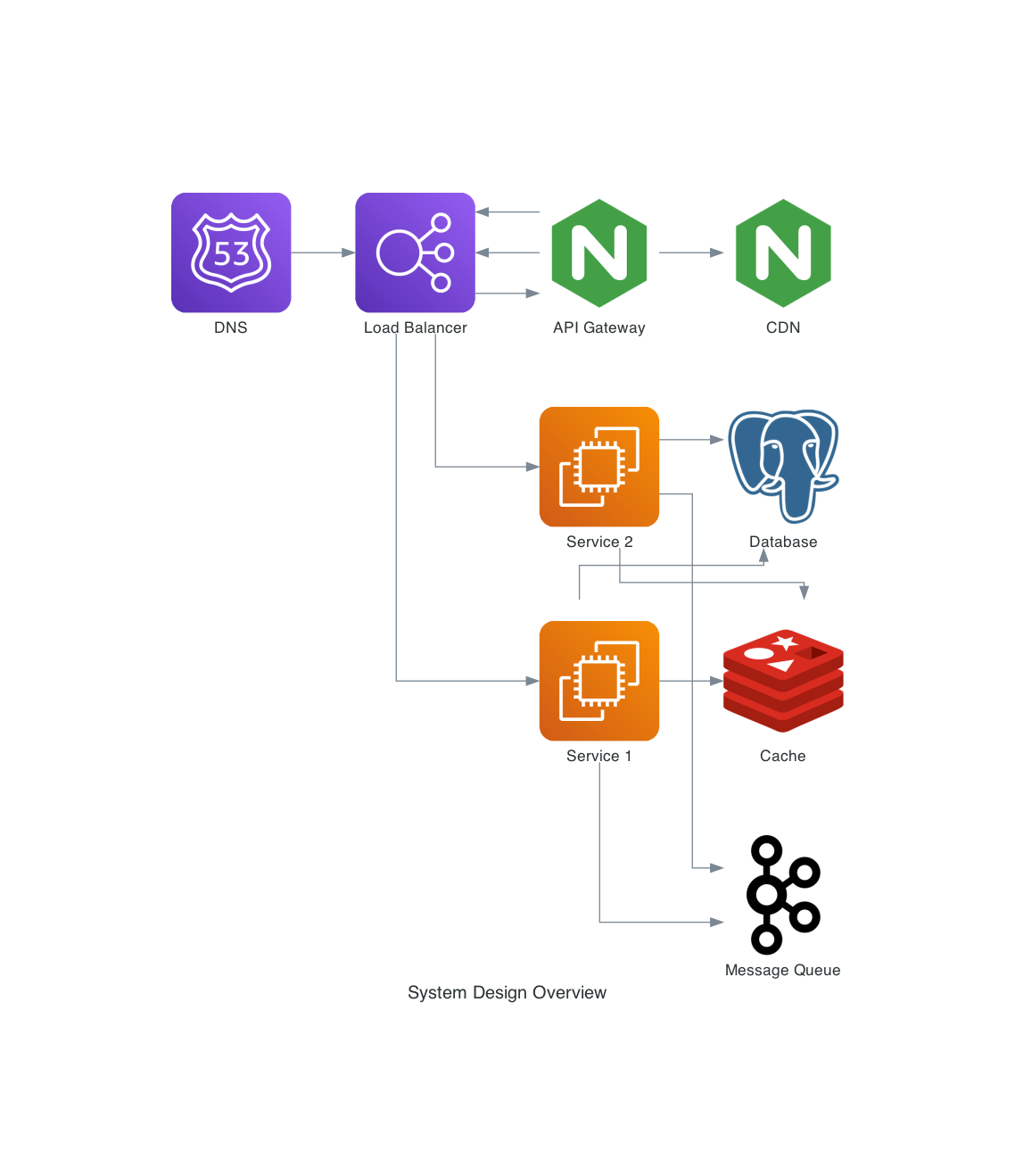
And there you have it, folks—your ultimate guide to mastering system design, complete with a Python-based master template! With this knowledge and toolset, you're well-equipped to navigate the fascinating world of system architecture.
So go ahead, get your hands dirty, and start designing systems like a pro!
Happy designing!